


Flux + Gemini 4 Carbon (Preview)

Flux is your AI hardware engineer, and we added Gemini 4 Carbon to Copilot.
An industrial inspection camera brings power, image processing, optics, and heat management into a constrained assembly. A change to one can require a review of the others. Bring your hardest, longest device tasks into Flux and ask for a multi-step review that connects the electronics to the mechanical design.
Try It Now
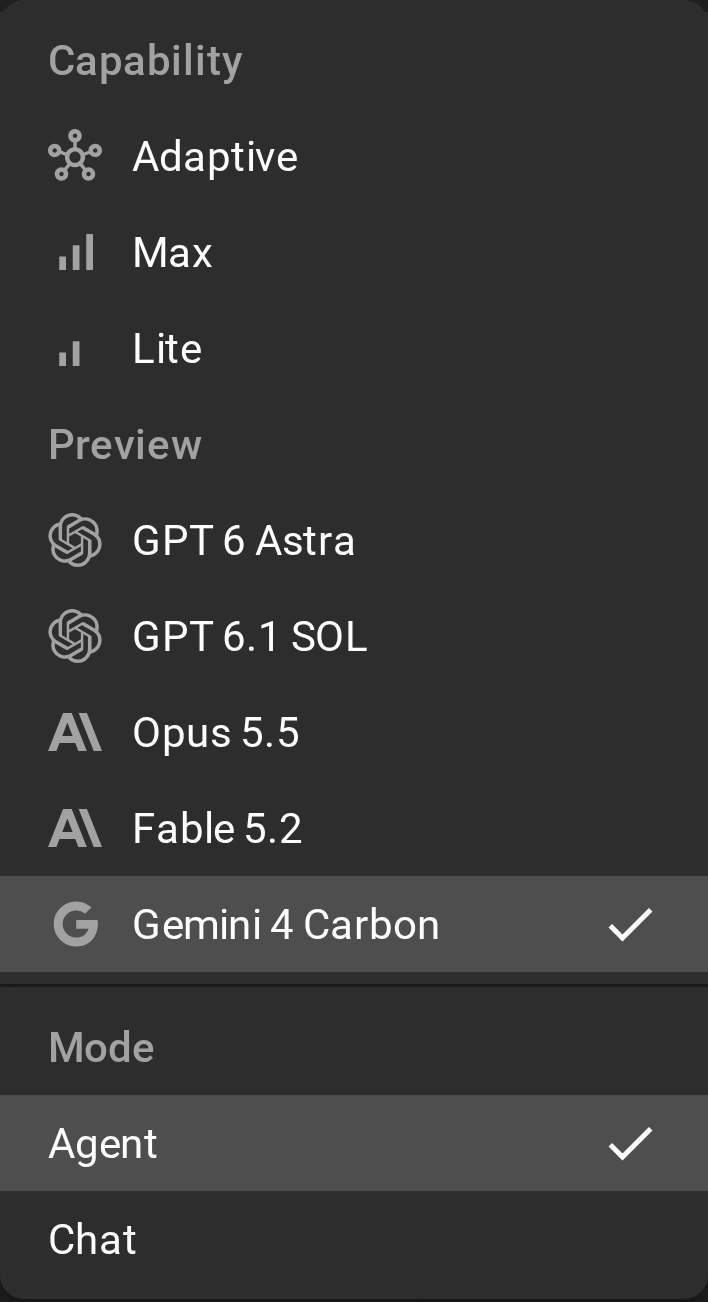
Open any project in Flux and launch Copilot. Open the model menu in the composer, find the Preview group, and select “Gemini 4 Carbon”. The preview is available to all customers through November 24, 2026. Start with a review that spans several design decisions:
“Review the inspection camera's power tree, image-sensor interfaces, and high-speed connections. Trace each requirement to the design, identify dependencies, and make a verification plan.”
“Review the camera's lens mount, board stack, heat path, and housing tolerances together. Plan the checks needed to keep optical alignment and service access consistent through assembly.”
Try Gemini 4 Carbon in Flux now
What’s New and Better
Gemini 4 Carbon is an option in the Preview group. The model menu describes it as “Google's reasoning model. Two-week preview, ends November 24, 2026.”
In its November 10 announcement, Google describes Carbon as its strongest model, built for long-horizon agentic work, complex multi-step coding and debugging, and deep reasoning. Carbon uses more tokens than Argon to explore thoroughly and run extended verification loops. Argon remains the choice for most work. Choose Carbon when the task needs a deep review across connected requirements:
- Trace electrical requirements through power, signal, and interface decisions.
- Connect mechanical tolerances, thermal paths, and assembly constraints.
- Work through dependencies in a multi-step design review.
- Repeat verification checks after changes to the complete device.
Flux has live context on your design, down to parts, pins, nets, properties, constraints, and stackups. Its automated workflows support stepwise actions, constraint-aware edits, and iterative design changes in your project. Bring the electronics and mechanical assembly into the same conversation. Share the device requirements and ask for a plan that carries them through each review and verification loop.
Try It on a Real Design
Use an industrial inspection camera as a device-level review task. Supply the sensor, processor, power-converter, and lens specifications, together with the mechanical drawings. Ask for a plan before requesting edits.
Review an industrial inspection camera with a 24 V DC input, an image-sensor board, a processing board, and a machined aluminum housing. Plan the checks for input protection, power sequencing, sensor clocks, and board-to-board signal integrity. Connect those checks to the lens-mount tolerance stack, board mounting, processor-to-housing heat path, connector access, and assembly sequence. Use the supplied datasheets, drawings, and operating requirements. Identify missing inputs, trace dependencies between electrical and mechanical decisions, and propose an ordered change plan. After each proposed change, state which calculations and fit checks must be repeated.
Continue from the review to the complete assembly. Ask for a verification loop that checks the power and sensor interfaces alongside optical alignment, thermal contact, and housing fit. Carry each change back to the requirements that it affects.
Getting the most from Gemini 4 Carbon in Flux
- Define the review. Supply the operating conditions, interface requirements, mechanical drawings, and acceptance criteria.
- Expose dependencies. Ask which electrical decisions affect thermal paths, mounting, and alignment, and which mechanical changes affect the electronics.
- Plan verification loops. Specify the calculations and assembly checks that must be repeated after a change.
- Plan before you act. Review the ordered change plan against the complete device requirements before requesting edits.
Switch Models Any Time
Flux is model agnostic. Copilot gives you the latest models from every major AI lab in one model menu, so you are never locked in to one lab.
Switching is easy. Open the model menu in the composer and select a different model. Your next message uses it, in the same conversation, with the same project context. Use Gemini 4 Carbon for one task, then compare it with a different model on the next task.
Or let Flux select the model for you. Adaptive gives each task to the model that does that task best for the price. Hard design decisions go to frontier models, and routine work goes to fast, low-cost models. You get frontier intelligence for less: Adaptive is a big part of why Flux is now about 70% cheaper to use. Adaptive is the default choice.
What’s Next
Use the preview for a device task that needs sustained reasoning across electronics and mechanics. Start with one review, then carry its findings through the next verification loop:
- Resolve the power-sequencing and image-sensor interface decisions.
- Check the lens alignment, heat path, and housing tolerance stack.
- Update the assembly plan as electrical and mechanical decisions change.
- Review the complete device against the acceptance criteria with your engineering team.
Open Flux and select “Gemini 4 Carbon” from the Preview group in the composer model menu. The preview is available through November 24, 2026. Bring the design question that needs a deeper review, and keep its electrical and mechanical requirements in the same project.
More in AI & Prompt Engineering for Hardware

What Makes a Perfect PCB Design Prompt

Prompting Guide: Working with Flux from Idea to Schematic

AI Design Reviews

5 Pro Tips for Better Routing with AI Auto-Layout

Top 20+ Flux Copilot Prompts for Hardware Design

6 Amazing Flux Copilot Prompts for Hardware Design in 2026

Top 20+ Flux Copilot Prompts (Refreshed)

6 Prompting Tips to Get the Most Out of Copilot

Top 9 Most Asked Questions in Flux

Flux Copilot Can Adapt To Your Objectives

Design Circuits with Natural Language: Copilot Upgrade

Teach Copilot How You Work with Knowledge

The First AI Hardware Engineer

AI Shortcuts for PCB Design

Less Clicking, More Building: The New AI-First UI

Introducing the AI Design Review Tab

Introducing AI Auto-Layout

AI Auto-Layout Just Got Smarter

AI Auto-Layout Winter Update

Ditch Datasheets with this Flux Copilot Upgrade

Flux Copilot Can Now See

AI for Firmware Development: How to Code Firmware Faster

Research Components Faster with AI

Streamline Component Research with AI

Instant Hardware Analysis with AI: Meet Copilot's Code Interpreter

AI for Electronics Testing and Debugging

AI for Functional Testing

AI-Driven PCB Cost Optimization

Simulate Circuits with a Prompt

Meet Files: AI-Native Project Documentation (2026 Update)

Flux Copilot: Under the Hood

How AI Is Changing PCB Design: Workflows, Teams, and Tools

Flux Copilot Just Got Smarter

The Future of Flux Copilot

AI-Powered Architecture Design

Flux Copilot - The First AI Powered Hardware Design Assistant

Generative AI for Hardware Design

AI Research & Planning

Smarter Copilot, Cleaner Layouts, Fewer Bugs

Introducing Copilot Knowledge Base for Flux Engineers

Flux + GPT-5 (Beta)

Flux + GPT 6 Astra

Flux + GPT 6.1 SOL

Flux + Opus 5.5

Flux + Fable 5.2 (Preview)

Flux + Gemini 4 Argon

Design hardware in the fast lane with Flux's new steerable agent
Let’s start building.

Let’s build your idea together. All you need to do is describe what you want to make, or what problem you want to solve. Flux will work with you to make it a reality.
